The receipt prints at the counter. That is where it should be logged.
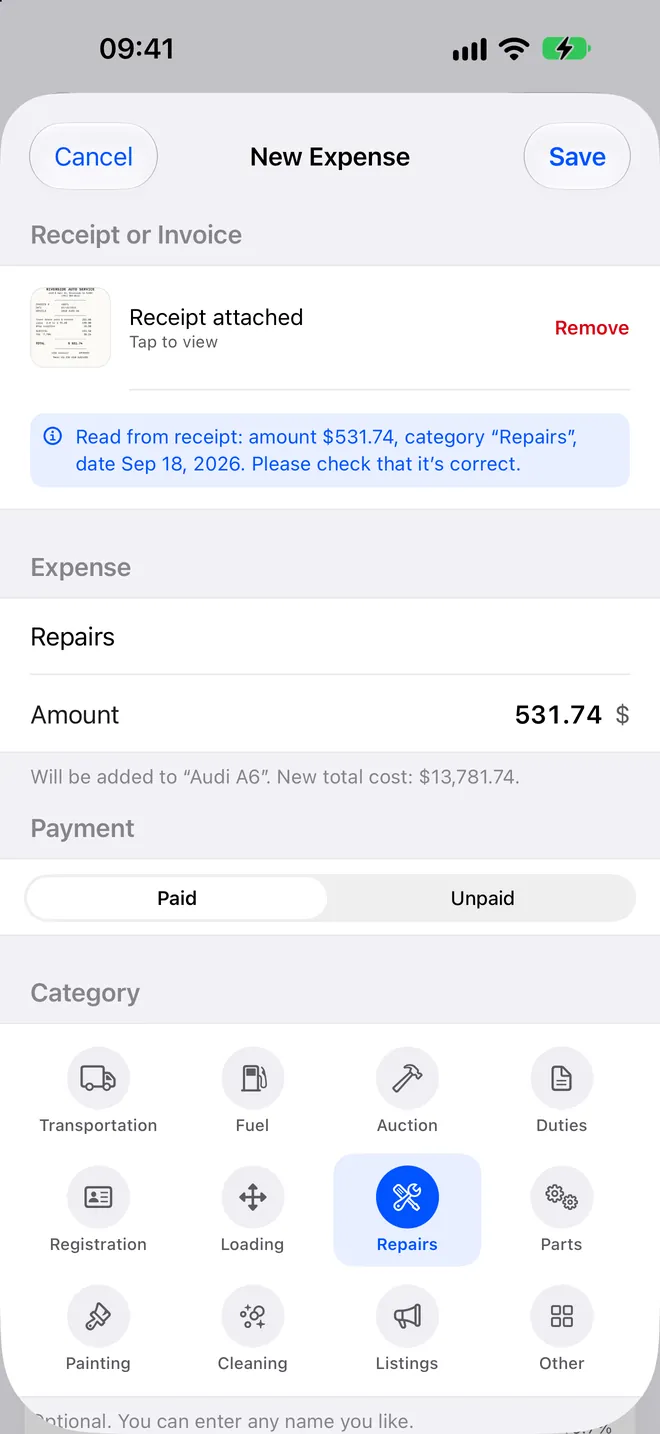
Deelary reads the amount, the date and the category from a photo of the receipt, on the device, and puts the expense on the car it belongs to. The total cost is right before you have walked back to the truck.
Where the margin actually leaks
Nobody forgets the purchase price. What gets forgotten is the $35 listing fee, the $85 title transfer, the $120 of small parts bought on three different trips, the $90 detail paid in cash. Each is too small to write down and together they are the difference between the profit you remember and the profit you made.
Expense tracking in most dealer software means a form on a desktop, filled in later from a pile of receipts, if the pile survives. Deelary moves the form to the moment the receipt exists. You photograph it, confirm the number, and it is on the car. Later never happens.
How a receipt becomes a cost
- Photograph it. At the parts counter, the tire shop, the detailer, the DMV window.
- The device reads it. Amount, date and a category guess, processed on the phone, not uploaded.
- Confirm with one tap. Correct the category if the guess was wrong. Pick the car if you have more than one open.
- The total moves. That car's total cost rises by the amount and its projected margin falls by the same, immediately.
- The photo stays. Attached to the expense, for the accountant, for a warranty claim, or for you in March.
- Paid or unpaid. Log the body shop estimate the day you get it. It counts in the car's total cost but stays out of the Invested figure until you mark it paid.
Costs that are not receipts
Your own labour, a holding cost per day, the trade-in you allowed: anything with an amount and a date is added by hand in a few seconds and treated exactly like a receipt. The app does not invent a daily holding rate for you. If you want one, put in yours.
What the categories are for
Every expense carries a category: transportation, fuel, auction, duties, registration, loading, repairs, parts, painting, cleaning, listings, other, or a name you type yourself. They are not for tidiness. They feed the reports, so you can see that cars from one auction average $300 more in parts than cars from the other, or that detailing is quietly a tenth of your reconditioning spend. Profit tracking is built on these categories.
If you are doing this in a spreadsheet today
The free car flipping spreadsheet has the same expense columns with the formulas in, and it works as long as the receipts go in the day they happen. The app exists for the day that stops being true.
Free for two cars on iPhone and iPad. Deelary Pro is $8.99 a month or $49.99 a year. Details on the pricing page.
Questions
What does the receipt photo actually read?
The amount, the date and a category guess, on the device, without sending the image anywhere. You confirm or correct in one tap and the expense is on the car. The photo stays attached so the accountant can see it later.
Does it work with no signal?
Yes. Parts counters, tire shops and auction sheds are exactly where signal fails, so everything saves on the device and syncs when the connection comes back. You never wait for a spinner to log a receipt.
What categories are there?
Transportation, fuel, auction, duties, registration, loading, repairs, parts, painting, cleaning, listings and other, and you can type any name you like for one that does not fit. The categories feed the reports, so you can see what a lane really costs you in reconditioning.
What does the Paid and Unpaid switch do?
An unpaid invoice still counts in the car's total cost, but it is left out of the Invested figure on the inventory screen, which only counts money that has actually left your account. So you can log the body shop estimate the day you get it without pretending you have paid it.
Can I split one receipt across two cars?
Yes. A parts run for two cars gets logged twice, once on each, with the amount split. The photo is attached to both.
What about costs that are not a receipt?
Add them by hand in a few seconds: your own labour, a holding cost per day, a trade-in allowance. Anything with an amount and a date goes on the car the same way.
Can I get the expenses out again?
Every car, expense and sale exports to CSV whenever you want, with the category and the date. The records are yours and do not depend on the subscription.